Nx (Mono repo)
모노레포에 대해서는 위 문서가 매우 자세하게 소개했습니다.
그 안에서 모노레포를 구성하는 여러 툴(yarn, Lerna, Nx, Turborepo)이 소개되는데 그 중 팀에서 택한 Nx에 대해 간단히 소개하고 겪은 문제에 대해 기술합니다.
Nx 기본 디렉토리 구조
.
├── angular.json
├── apps/
│   ├── api/
│   ├── client/
│   └── client-e2e/
├── libs/
│   └── api-interfaces/
├── nx.json
├── package.json
├── tools/
└── tsconfig.base.json
- apps: 어플리케이션 소스
- libs: 어플리케이션 공통 소스
- tools: 어플리케이션 관련 소스를 제외한 나머지 (helm 차트, docker 파일 등)
- angular.json : 각 프로젝트 네임과 path를 매핑 (version 2)
- 파일 내용에 version 1은 기존에 사용하던 앵귤러 빌드 설정 포맷
- version 2 는 angular.json 파일을 각 프로젝트로 쪼갠 형태 https://nx.dev/getting-started/nx-and-angular#angular.json
- nx.json : nx cli 옵션 설정 https://nx.dev/configuration/packagejson#cli-configuration
- tsconfig.base.json : 타입스크립트 빌드 옵션 베이스 파일
각 프로젝트 (Library, Apps) 하위 디렉토리 구조
│   ├── api/
│   │   ├── project.json
│   │   ├── src/
│   │   ├── tsconfig.app.json
│   │   ├── tsconfig.editor.json
│   │   ├── tsconfig.json
│   │   └── tsconfig.spec.json
- project.json : 프로젝트 설정(빌드, 테스트, 린트 등) 파일 https://nx.dev/configuration/projectjson#project-configuration
- 기존에 앵귤러 빌드 설정 파일(angular.json)과 형태가 비슷
- tsconfig.json : 레포지토리 루트 경로의 tsconfig.base.json 파일을 확장하여 사용
- tsconfig.app.json : 애플리케이션 빌드 설정
- tsconfig.editor.json : IDE에서 타입 오류를 잡을 때 해당 파일 설정을 참고
- tsconfig.spec.json : 테스트 설정
문제점
프로젝트 의존성 관리
모노레포로 멀티 프로젝트를 관리하면서 각 프로젝트의 의존성 관리가 중요하다.
잘못 관리하는 경우
- 클라이언트 프로젝트가 서버의 디비 스키마 파일을 import 하게 되어서 보안적인 문제가 생긴다.
- 서스테이닝 단계에서 클라이언트의 공통 소스 파일을 고쳤는데 서버 프로젝트가 영향을 받는다.
- 클라이언트에서 서버 라이브러리를 호출하게 되어서 프로젝트가 알 수 없는 에러를 내뱉는다.
- 특히 Nestjs, Angular이 모노레포에 같이 존재하면 매우 빈번히 교차 import가 발생한다. (Nestjs 설계가 Angular에서 많은 영감을 받아... 기본적인 모듈 네이밍이 같다.)
등 여러 경우가 발생할 수 있으니 nx에서는 프로젝트 의존성 관리를 위해서 eslint 룰을 적용하여 강제하기도 하고 nx graph를 지원하여 프로젝트 의존성 시각화 툴도 제공한다.
eslint rule(@nrwl/nx/enforce-module-boundaries)
docs
- https://nx.dev/structure/monorepo-tags
- https://blog.nrwl.io/mastering-the-project-boundaries-in-nx-f095852f5bf4
각 프로젝트마다 태그를 정의하고 ex) library:api-interface, apps:server ...
project.json > tags에서 프로젝트의 태그를 정의 (https://nx.dev/structure/monorepo-tags#tags)
eslint에서 해당 프로젝트에서 import하거나 ban할 태그들의 바운더리를 정할 수 있다.
아래는 NestJs를 사용하는 서버 프로젝트에서 바운더리를 정하는 예시다.
- api-interfaces와 서버 공통소스는 사용, 클라이언트 공통소스는 막고, 외부 라이브러리 중 앵귤러도 막는다.
- sourceTag: 프로젝트의 태그 네임 (에러 메시지에 넣기 위해서만 사용하지 다른 기능 없다. 태그 정의 자체는 project.json 파일에서 한다)
- onlyDependOnLibsWithTags: 해당 태그들의 소스만 import 하겠다는 내용, 자신의 태그도 넣어야함
- notDependOnLibsWithTags: import하지 않는 소스의 태그들
- bannedExternalImports: 모노레포 하위의 프로젝트 말고 외부 라이브러리도 체크 ex) 서버 프로젝트에서 앵귤러를 가져오는걸 막음
{
  "root": true,
  "ignorePatterns": ["**/*"],
  "plugins": ["@nrwl/nx"],
  "overrides": [
    {
      "files": ["*.ts", "*.tsx", "*.js", "*.jsx"],
      "rules": {
        "@nrwl/nx/enforce-module-boundaries": [
          "error",
          {
            "enforceBuildableLibDependency": true,
            "allow": [],
            "depConstraints": [
              {
                "sourceTag": "apps:api",
                "onlyDependOnLibsWithTags": ["apps:api","library:api-interfaces", "library:server-shared"],
				"notDependOnLibsWithTags": ["library:client-shared"],
				"bannedExternalImports": ["@angular/*"]
              }
            ]
          }
        ]
      }
    }
  ]
}
중요한 설정은 depConstraints에 정의하고 있고 그 외 다른 옵션들도 존재한다 참고 (https://github.com/nrwl/nx/blob/3b1ea739f911b4655e33fdced5708140ebadc59c/packages/eslint-plugin-nx/src/rules/enforce-module-boundaries.ts#L74-L106)
tsconfig paths
위의 eslint로 룰을 정의하고 그대로 프로젝트에서 상대 혹은 절대경로로 다른 프로젝트의 소스를 import하면 오류가 발생한다.

@nrwl/nx/enforce-module-boundaries 룰에서 해당 설정만 on off 할 수 없다. 무조건 npm scope를 통해서 가져와야한다. (아니면 그냥 해당 eslint 룰을 가져오지 말아야함)
npm scope 정의는 tsconfig > paths에서 한다.
{
  "compileOnSave": false,
  "compilerOptions": {
    "rootDir": ".",
    "sourceMap": true,
    "declaration": false,
    "moduleResolution": "node",
    "emitDecoratorMetadata": true,
    "experimentalDecorators": true,
    "strictPropertyInitialization": false,
    "importHelpers": true,
    "target": "es2017",
    "module": "esnext",
    "lib": ["es2017", "dom"],
    "skipLibCheck": true,
    "skipDefaultLibCheck": true,
    "baseUrl": ".",
    "paths": {
      // 클라이언트 공통 컴포넌트
      "@client/components": ["libs/client/src/components/index.ts"]
    }
  },
  "exclude": ["node_modules", "tmp"]
}
Etc
nx graph
모노레포에 있는 프로젝트들 사이의 의존성 시각화
nx graph # 브라우저에서 오픈
nx graph --file=output.json # json 파일로 추출
nx graph --file=output.html # static 파일들 생성, nx graph 와 동일한 뷰
아래와 같은 구조라 하면
.
├── apps
│   ├── app1
│   │   ├── app1-client
│   │   │   └── tsconfig.json (extends tsconfig.client-base.json)
│   │   └── app1-server
│   │       └── tsconfig.json (extends tsconfig.server-base.json)
│   └── app2
│       ├── app2-client
│       │   └── tsconfig.json (extends tsconfig.client-base.json)
│       └── app2-server
│            └── tsconfig.json (extends tsconfig.server-base.json)
├── libs
│   ├── client
│   │   ├── src
│   │   └── tsconfig.json (extends tsconfig.base.json)
│   ├── data
│   │   ├── src
│   │   └── tsconfig.json (extends tsconfig.base.json)
│   ├── server
│   │   ├── src
│   │   └── tsconfig.json (extends tsconfig.base.json)
│   └── utils
│       ├── src
│       └── tsconfig.json (extends tsconfig.base.json)
├── nx.json
├── nx.md
├── package-lock.json
├── package.json
├── tree.md
├── tsconfig.base.json
├── tsconfig.client-base.json
└── tsconfig.server-base.json
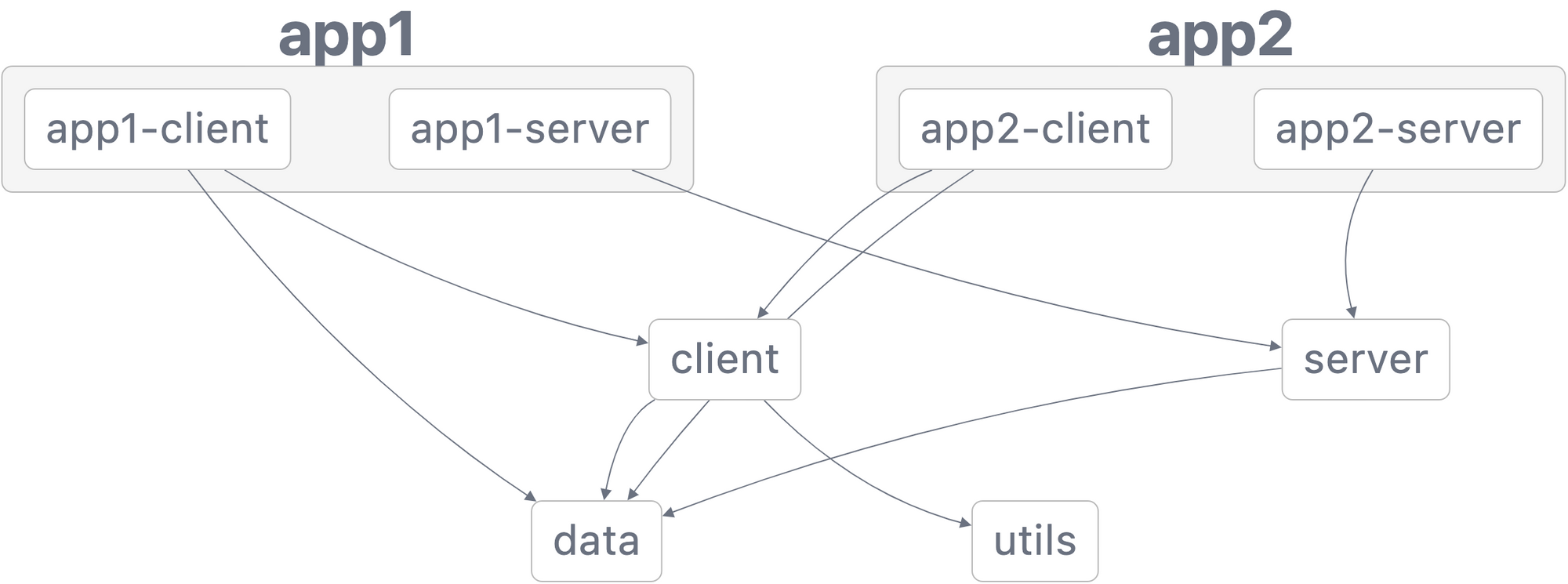
위와 같이 시각화하여 모노레포 구조를 쉽게 파악할 수 있도록 한다. (README.md에 같이 넣으면 좋을듯)
For anyone exploring a character design, it is worth considering how details related to cosplay props will affect the complete look. During a long convention day, it helps to assess details related to cosplay shoes together with fit and fabric. For combinations connected with details related to cosplay props, cosplay shoes for conventions offers a useful starting point for practical preparation. To reuse the pieces at future events, it is useful to check details related to fabric and comfort against the wearer's own needs.